
Last updated on
Oct 31, 2026
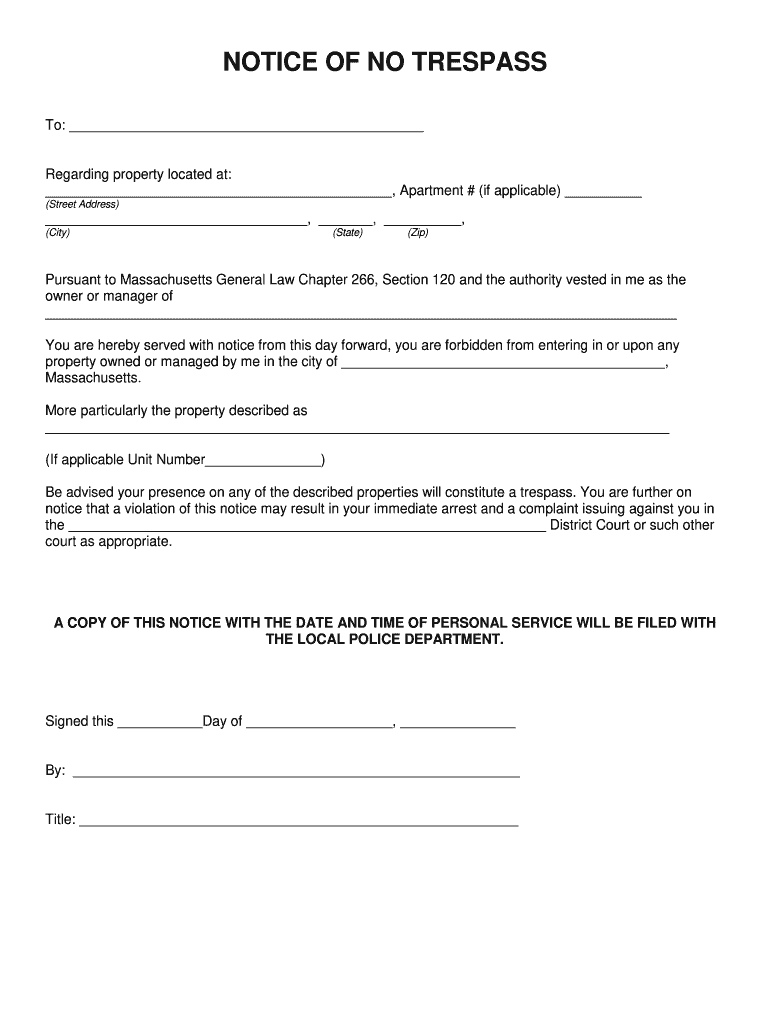
MA Notice of No Trespass free printable template
pdfFiller is not affiliated with any government organization

Fill out
Complete the form online in a simple drag-and-drop editor.

eSign
Add your legally binding signature or send the form for signing.

Share
Share the form via a link, letting anyone fill it out from any device.

Export
Download, print, email, or move the form to your cloud storage.
Why pdfFiller is the best tool for your documents and forms


End-to-end document management
From editing and signing to collaboration and tracking, pdfFiller has everything you need to get your documents done quickly and efficiently.
Accessible from anywhere
pdfFiller is fully cloud-based. This means you can edit, sign, and share documents from anywhere using your computer, smartphone, or tablet.
Secure and compliant
pdfFiller lets you securely manage documents following global laws like ESIGN, CCPA, and GDPR. It's also HIPAA and SOC 2 compliant.
What is MA Notice of No Trespass
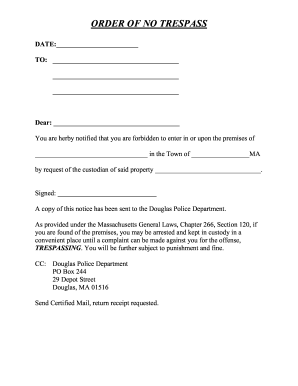
The No Trespass Notice is a legal document used by property owners or managers in Massachusetts to prohibit individuals from entering their property.
pdfFiller scores top ratings on review platforms




Finally...something which works to eliminate the tedious task of form completion. Thank you.
I' am elated with the use of your service it is easy fast and simple
Who needs MA Notice of No Trespass?
Explore how professionals across industries use pdfFiller.

MA Notice of No Trespass is needed by:
-
Property owners wanting to restrict access
-
Managers of commercial properties seeking legal protection
-
Landlords dealing with unwanted tenants or individuals
-
Real estate agents assisting clients in property management
-
Local police departments requiring documented notices
-
Legal professionals providing assistance to clients
Comprehensive Guide to MA Notice of No Trespass
What is a No Trespass Notice in Massachusetts?
A No Trespass Notice is a legal document specific to Massachusetts aimed at informing individuals that they are prohibited from entering a particular property. This document serves an essential role in maintaining property security and is crucial for property owners or managers. Violating a No Trespass Notice can lead to legal repercussions, such as arrest or criminal charges.
Purpose and Benefits of Using a No Trespass Notice
The primary purpose of issuing a No Trespass Notice is to maintain property security and prevent unauthorized access. By clearly communicating restrictions, property owners protect their interests and establish legal grounds for enforcement. Benefits include:
-
Reduction of unwanted intrusion on the property
-
Legal protection for property owners in the event of disputes
-
Facilitation of law enforcement involvement in case of violations
Key Features of the Massachusetts No Trespass Notice
Key components of the No Trespass Notice form include essential fillable fields such as the property address and the individual's name. A crucial requirement is the signature of the property owner or manager, affirming their request for restrictions. Additionally, the completed document can be filed with local police departments to reinforce its legality.
Who Should Use a No Trespass Notice?
This notice is essential for property owners and managers in Massachusetts who seek to protect their properties. Scenarios in which this notice may be necessary include instances of trespassing or unauthorized access. Landlords, in particular, can use this notice to safeguard their rental properties from unwanted entry.
How to Complete the No Trespass Notice Form Online (Step-by-Step)
Filling out the No Trespass Notice form online can be done efficiently by following these steps:
-
Access the No Trespass Notice template online.
-
Fill in the required fields, such as the property address and the individual's name.
-
Ensure to include the property owner's or manager's signature.
-
Highlight any specific areas of concern or instructions if necessary.
-
Review the completed form for accuracy before submitting.
Filing and Submission of the No Trespass Notice
Filing the No Trespass Notice with local authorities is a key step in enforcing your property rights. The submission process can be done either in person or electronically, depending on your local regulations. It is important to be aware of any deadlines and associated fees that may apply during the filing process.
Consequences of Violating a No Trespass Notice
Individuals who disregard a No Trespass Notice face serious legal repercussions, including potential arrest or legal proceedings. Having proper documentation is crucial for law enforcement reference and to bolster your claim in legal matters.
Security and Compliance for Your No Trespass Notice
Securing sensitive information when completing legal forms is vital. pdfFiller emphasizes data protection, employing 256-bit encryption and adhering to compliant regulations like HIPAA and GDPR. These measures ensure user privacy and security throughout the filing process.
Accessing and Saving Your Completed No Trespass Notice PDF
After completing the No Trespass Notice, users can easily download and save the document for their records. It is advisable to print the notice for distribution while keeping a copy for legal defenses, ensuring thorough documentation of the process.
Empower Your Property Management with pdfFiller
Leveraging pdfFiller simplifies the form completion process, making it an invaluable tool for property management. The platform offers additional features that streamline document management, reinforcing the advantages of using pdfFiller for your No Trespass Notice needs.
How to fill out the MA Notice of No Trespass
-
1.To start, access pdfFiller and use the search bar to find the No Trespass Notice form.
-
2.Click on the form to open it in the editor, where you can directly fill in the required fields.
-
3.Before filling, gather necessary information, such as the property address, name of the individual being trespassed, and your own name as the property owner or manager.
-
4.Begin completing the form by entering the property address in the designated field accurately.
-
5.Next, input the name of the individual you wish to restrict from entering your property.
-
6.Ensure you review any additional fields, such as dates or specific conditions for the notice, ensuring accuracy.
-
7.Utilize the fillable fields and checkboxes, ensuring all required information is filled in before proceeding.
-
8.Once the form is completely filled out, review all entries for accuracy to avoid mistakes.
-
9.Finalize your document by providing your signature in the specified field.
-
10.Review the completed form one last time, ensuring all sections are correctly filled and signed.
-
11.To save your form, click on the save option in the editor, choosing your desired file format.
-
12.You can download the finalized No Trespass Notice for your records or submit it following local procedures.

Who is eligible to file a No Trespass Notice?
Property owners or managers in Massachusetts who wish to prohibit specific individuals from entering their property can file a No Trespass Notice.
Are there any deadlines for issuing the No Trespass Notice?
While there are no strict deadlines, it is advisable to issue the No Trespass Notice promptly if you feel trespass is imminent or ongoing to establish legal grounds.
How should I submit the completed No Trespass Notice?
The completed No Trespass Notice should typically be filed with your local police department, so be sure to follow any local procedures for submission.
What supporting documents are required with the No Trespass Notice?
Usually, no additional documents are needed. However, it may be beneficial to have proof of property ownership or previous incidents involving the individual in question.
What common mistakes should I avoid when filling out the No Trespass Notice?
Ensure all fields are filled in accurately, especially the property address and name of the individual. Double-check for any spelling errors before signing.
How long does it take for a No Trespass Notice to be processed?
Processing times can vary, but typically, you will receive confirmation from the police department within a few days after submission.
Is notarization required for the No Trespass Notice?
No, notarization is not required for the No Trespass Notice; a signature from the property owner or manager suffices.
Related Content
Related Forms




Related Catalogs
Get the latest insights from our blog



If you believe that this page should be taken down, please follow our DMCA take down process
here
.
This form may include fields for payment information. Data entered in these fields is not covered by PCI DSS compliance.